Best Free & Open-Source Codex Skins: What the Public Repos Give You
Every skin in this index is free. This roundup covers where free codex skins come from, what an open source codex theme ships with, how to vet a community codex skin repository, and the safe order for a free codex skin download.
Best Free & Open-Source Codex Skins: What the Public Repos Give You
Free codex skins are the default here, not the exception. Every entry in this index, 103 of them at the last count, traces back to a public repository or to an engine author shipping presets, and none of them asks for payment before you can apply the palette. That makes “free” a weak filter on its own. What actually separates one community skin from another is where it came from, what it ships with, and whether anybody still maintains it. Below: the four sources worth knowing, a checklist for reading a repo, and four picks that cost nothing and hold up all day.
Where free open source codex skins come from
Almost everything in the index comes from one of four places.
- Community collections. The
Wangnov/awesome-codex-skinsrepo is the largest single contributor here, importing skins in batches.HeiGeAi/heige-codex-skin-studioadds character and fandom themes on top of that. - Engine authors. Dream Skin ships its own presets out of
Fei-Away/Codex-Dream-Skin, and those presets are open source by construction: the author published the tool, so the bundled skins travel with it. - Ports of classic palettes. Solarized, Monokai and Tokyo Night were never written for Codex. People carried them over, and the ports inherit whatever licence the original used.
- Bulk community imports. The unclassified part of the index, the skins sitting outside the curated categories, is where the oddest palettes live and where most new entries arrive.
That fourth bucket is the one worth browsing on a slow afternoon. Curated lists show you what already did well; unclassified imports show you what somebody bothered to make.
What an open source codex theme ships with
| Piece | What it does | Can you edit it |
|---|---|---|
| Colour palette | Background, foreground and the 16 accent slots | Yes |
| Install prompt | The line you paste into Codex Desktop | Yes |
| Theme file | .codedrobe-theme or .codextheme for CLI imports | Yes |
| Preview render | The static screenshot on the index page | n/a |
The detail that matters is that the first three are plain text. A community skin is not a compiled blob you have to trust blindly; it is a config file you can open, and if one accent colour is wrong for your eyes you copy the file and change that hex value. Nothing stops you.
Reading a community codex skin repository
Public does not mean reviewed. Four checks take under a minute and catch most of what goes wrong:
- Look at where
sourceUrllands. A link into askins/subfolder means the skin is one entry in a maintained collection; a link to an account root with no context is weaker. - Compare
updatedAtto your engine version. A skin untouched since before the last major release is the one most likely to render wrong. - Read the install prompt before pasting it. A prompt that describes colours is fine. One that pulls remote content during install is a separate decision.
- Count the siblings. Batch imports are efficient, and the skins that survive review tend to sit beside peers that are also still maintained.
None of this is about distrust. It is about noticing the difference between a maintained collection and one person’s abandoned fork before you build a workflow on top of it.
Free codex skin download, in the safe order
- Start on the skin page in this index, not on the repository. The page normalises the source link and states which platform the skin targets, desktop or CLI.
- Copy the install prompt, or run
/theme <slug>from Codex CLI, instead of pasting shell commands you have not read. - Apply it, then revert once immediately so you know the rollback path before you actually need it.
No legitimate free codex skin download asks for an account, a licence key, or a store redirect. If a listing calling itself free asks for any of those, close it and use the sourceUrl on the skin page instead.
Four picks that cost nothing
| Skin | Source repo | Why it earns a slot |
|---|---|---|
| Dalao Smoke | HeiGeAi/heige-codex-skin-studio | Muted low-contrast grey that stays out of the way for long sessions |
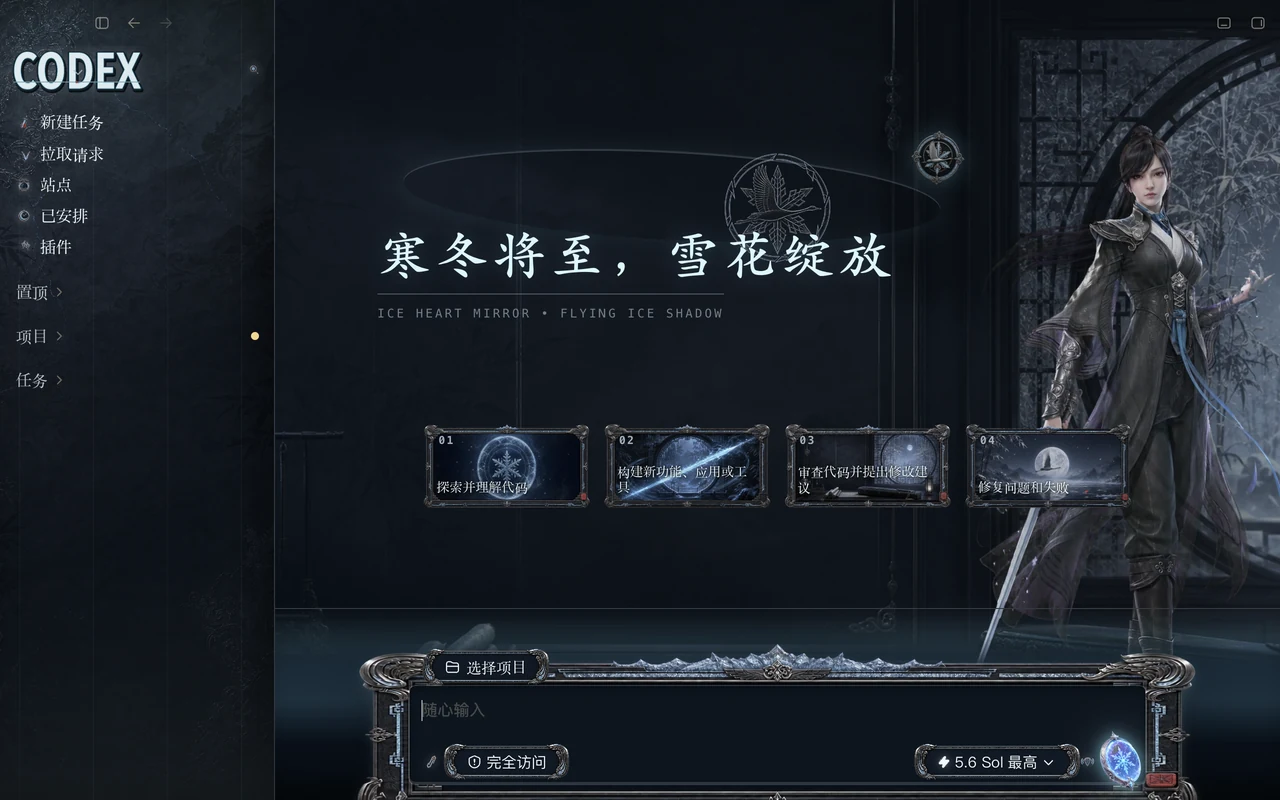
| 藏雨冰镜 / Frostbound | Wangnov/awesome-codex-skins | Cool ice-blue that pairs cleanly with a dark terminal palette |
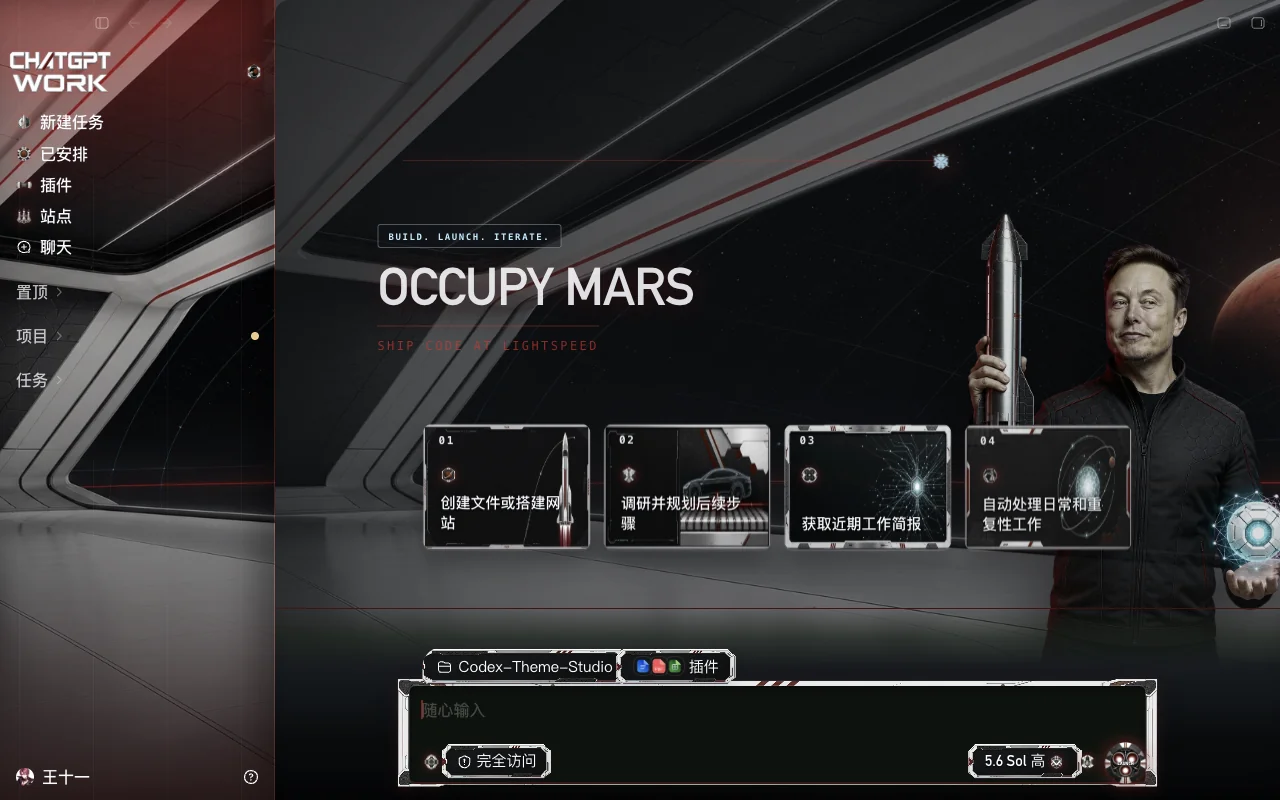
| Elon Mars Protocol | Wangnov/awesome-codex-skins | Rust and dust tones for people who find pure blacks flat |
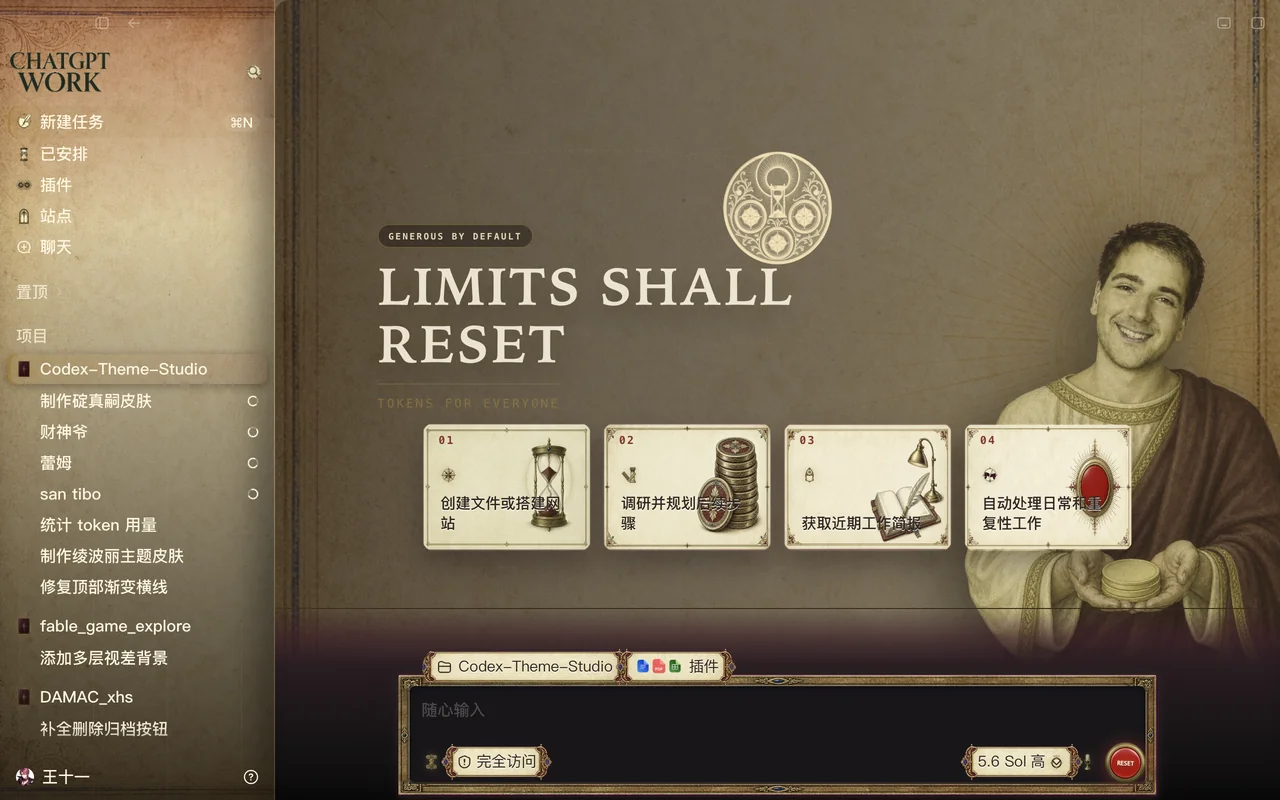
| San Tibo | Wangnov/awesome-codex-skins | Neutral mid-tone you can leave on from morning to evening |
All four come with a preview render, so you can rule one out before installing it. If none of them fits, the daily decisions are less about the skin than about the light in the room; pairing a dark pick with a light one for daytime is usually the easier answer.
Licence notes worth reading once
Ports inherit the licence of whatever they were ported from, and the index page does not always restate it. A Tokyo Night port carries whatever Tokyo Night carries. If you are bundling a skin into something you ship, open the upstream repo and check. Personal use is rarely a question; redistribution is the part people get wrong.
FAQ
Are free skins lower quality than paid ones? Not in any consistent way. Quality here is palette discipline and maintenance, and both community collections above are actively maintained. What money buys elsewhere is support and update guarantees, not better colours.
Why are so many community skins uncategorised? Batch imports land faster than anyone can classify them. It is a housekeeping backlog in the index, and it does not say anything about the skins themselves.
Do I need all 103? No. Two installed skins, one light and one dark, cover most weeks. The value of the library is being able to leave quickly, not owning everything.
Related Skins
- Dalao Smoke - low-contrast grey for long sessions
- 藏雨冰镜 / Frostbound - cool ice-blue
- Elon Mars Protocol - warm rust palette
- San Tibo - neutral all-day tone
Browse the full skin index to see everything currently free, or read the install guide to get your first one running. Switching between two by command is covered in the cheat sheet.
免费开源 Codex 皮肤精选:公共仓库里现成的好皮
在 Codex 皮肤索引里,免费是常态而不是例外。截至最近一次统计,这里收录的 103 个皮肤全部来自公开仓库,或者来自引擎作者自带的预设包,没有任何一个需要你先付钱才能应用配色。既然如此,“免费”本身就不是一个有效的筛选条件。真正区分社区皮肤的是另外三件事:它从哪儿来、里面装了什么、还有没有人维护。下面列出四类主要来源、一套读仓库的清单,以及四款不要钱也足够扛一整天的选择。
免费开源 Codex 皮肤从哪来
索引里几乎所有条目,都出自以下四类之一。
- 社区合集。
Wangnov/awesome-codex-skins是这里最大的单一来源,一次批量导入一批皮肤;HeiGeAi/heige-codex-skin-studio在此基础上补了大量角色向作品。 - 引擎作者自带。 Dream Skin 的预设随
Fei-Away/Codex-Dream-Skin一起发布,这类预设天然就是开源的——作者既然公开了工具,配套的皮肤也跟着一起流出。 - 经典配色的移植。 Solarized、Monokai、Tokyo Night 本来都不是为 Codex 写的,是有人把它们搬了过来,移植版本沿用原始调色板的授权。
- 批量社区导入。 索引里那些还没归类、落在精选类目之外的皮肤,往往藏着最奇怪的配色,也是新条目来得最快的地方。
第四类最适合闲下来的时候翻。精选清单告诉你什么已经跑出来了,未归类区告诉你还有人愿意做些什么。
一个开源 Codex 主题到底装了什么
| 组成部分 | 作用 | 能改吗 |
|---|---|---|
| 调色板 | 背景色、前景色以及 16 个强调色槽 | 能 |
| 安装提示词 | 粘贴进 Codex Desktop 的那句话 | 能 |
| 主题文件 | .codedrobe-theme 或 .codextheme,供 CLI 导入 | 能 |
| 预览图 | 索引页面上那张静态截图 | 不需要 |
关键在前三项都是纯文本。社区皮肤不是那种只能闭着眼信的编译产物,而是一个可以打开看的配置。哪个强调色你觉得刺眼,就把文件复制一份改掉那个色值,没有任何东西拦着你。
怎么读一个社区皮肤仓库
公开不等于过审。下面四条不到一分钟就能过完,能挡掉大部分问题:
- 看
sourceUrl落在哪儿。链接指向skins/子目录,说明它是某个有人在管的合集里的一条;指到某个账户根目录、前后没有任何上下文,可信度就低一档。 - 把
updatedAt和你的引擎版本对着看。在上一个大版本之前就没动过的皮肤,最容易渲染出错。 - 粘贴前先读安装提示词。只描述颜色的提示词没问题;安装过程中要去远程拉东西的,那是另一回事。
- 数一数同级条目有多少。批量导入效率高,而能活下来的皮肤通常也挨着一堆同样还在维护的邻居。
这不是要你不信任谁,而是在把工作流搭上去之前,先分清楚”有人维护的合集”和”某个人弃坑的分支”。
免费 Codex 皮肤下载的正确顺序
- 从本索引的皮肤页开始,不要直接跳到仓库。皮肤页会把源链接标准化,还会标明这个皮肤面向桌面端还是 CLI。
- 复制安装提示词,或在 Codex CLI 里跑
/theme <slug>,而不是粘贴一段你没读过的 shell 命令。 - 应用之后立刻回滚一次,先确认退路在哪,真要用到时才不至于手忙脚乱。
正规的免费皮肤不会问你要注册账号、授权码,也不会把你导去某个商店页面。自称免费却要这些的,关掉它,改用皮肤页上的 sourceUrl。
四款不要钱的推荐
| 皮肤 | 来源仓库 | 凭什么占一个位置 |
|---|---|---|
| Dalao Smoke | HeiGeAi/heige-codex-skin-studio | 低对比的沉静灰,长时间写代码也不抢戏 |
| 藏雨冰镜 | Wangnov/awesome-codex-skins | 清冷冰蓝,配深色终端很干净 |
| Elon Mars Protocol | Wangnov/awesome-codex-skins | 铁锈与尘土色,嫌纯黑太闷的可以试它 |
| San Tibo | Wangnov/awesome-codex-skins | 中性中间调,从早挂到晚都不累 |
四款都有预览图,装上之前就能先排除掉不合意的。如果都不合适,问题多半不在皮肤而在你房间的光线——配一个深色款加一个浅色款白天轮换,通常比继续换皮肤更有效。
值得一读的授权说明
移植版沿用原始调色板的授权,而索引页并不总把它复述一遍:Tokyo Night 的移植版就跟着 Tokyo Night 走。你要把某个皮肤打包进自己发布的东西里,就去上游仓库确认。个人使用基本不用纠结,容易出问题的是二次分发。
常见问题
免费皮肤的质量比付费的差吗? 没有稳定的差距。这里的质量指的是配色克制程度和有没有人维护,上面两个社区合集都还在活跃维护。别处花钱买到的是支持和更新承诺,不是更好看的颜色。
为什么社区皮肤里没归类的那么多? 批量导入跑得比归类快。这是索引自己的整理欠账,跟皮肤本身好不好没关系。
103 个我都要装吗? 不用。装两个,一深一浅,绝大多数时候够用了。皮肤库的价值在于随时能换,不在于把每个都收进碗里。
相关皮肤
- Dalao Smoke - 低对比灰,适合长时间 coding
- 藏雨冰镜 - 清冷冰蓝
- Elon Mars Protocol - 暖铁锈色系
- San Tibo - 全天通用中性调
Skins mencionadas en este artículo
 Dalao Smoke ~0 instalaciones (aprox.)
  藏雨冰镜 ~0 instalaciones (aprox.)
  Elon Mars Protocol ~0 instalaciones (aprox.)
  San Tibo ~0 instalaciones (aprox.)
 Ver todo skins .